Core Web Vitals in plain English (and how to pass them).
LCP, INP and CLS shape how fast your site feels and feed into Google's page experience signals. Here's what each one measures and the fixes that help most.
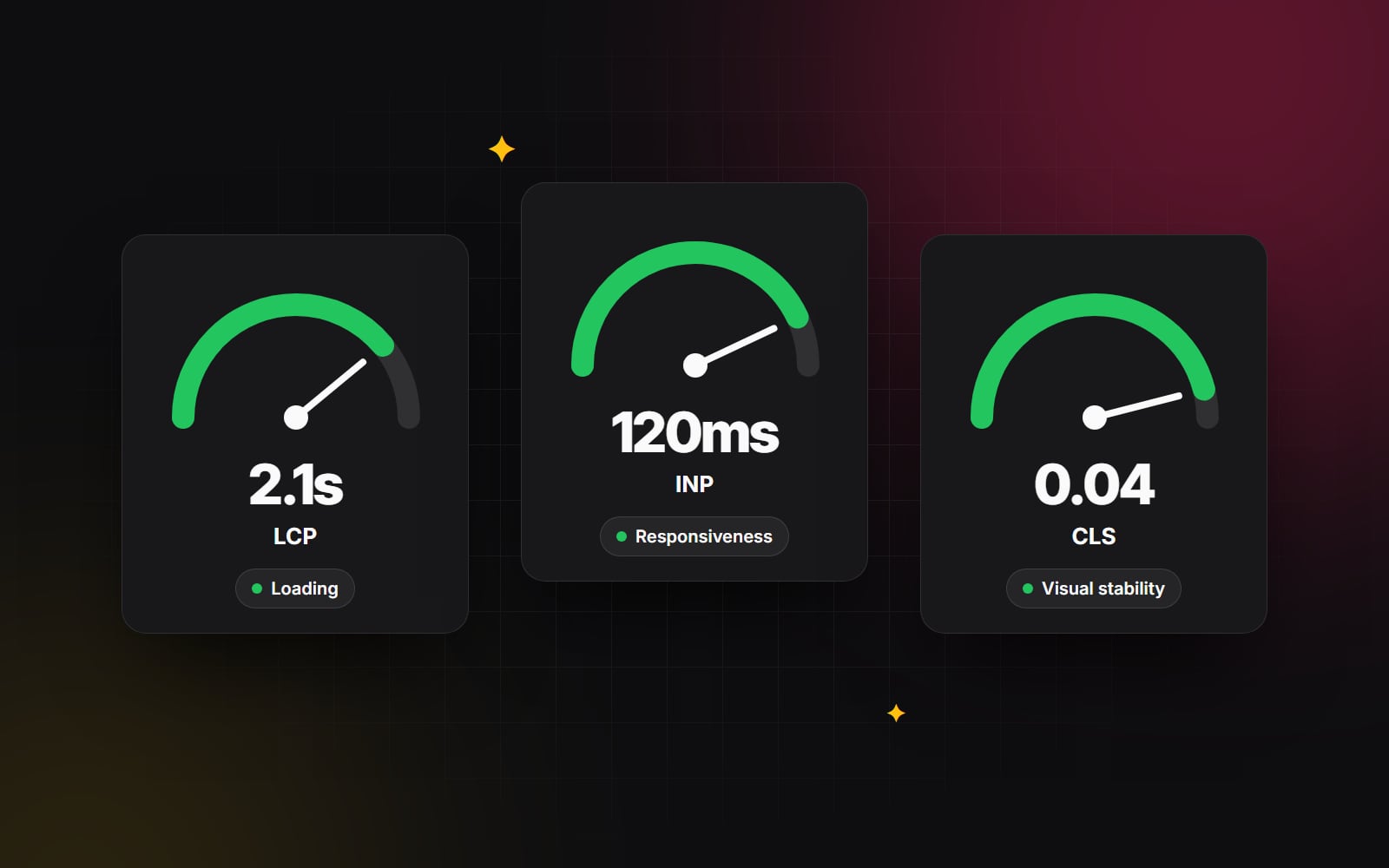
If you've spent any time inside Google Search Console or PageSpeed Insights lately, you've likely encountered red warning bars pointing to failed Core Web Vitals. For many business owners and marketers, these reports feel like an overwhelming barrage of technical acronyms: LCP, INP, CLS, TTFB, and TBT.
It’s easy to dismiss them as developer obsession over meaningless fractional scores. But Google uses Core Web Vitals as part of its page experience signals. They won't outrank genuinely better content, but they can make the difference between similar pages. More importantly, faster and steadier pages keep visitors around longer and tend to convert better.
Let's strip away the jargon. Here is what each Core Web Vital actually measures in plain English, why your site is failing, and the exact architectural fixes our development team implements to turn those metrics green.
1. LCP (Largest Contentful Paint): How fast does the main content load?
LCP measures the time it takes for the largest visual element on the screen — typically your hero image, background video banner, or primary H1 headline — to fully render above the fold. Google expects this to happen within 2.5 seconds or faster.
Why websites fail LCP
- Massive, uncompressed hero imagery: Uploading 4MB raw PNGs or unoptimized stock photography straight from a camera or Figma export.
- Client-side JavaScript rendering delays: Frameworks that require 600KB of JavaScript to load and execute before the browser even discovers that a hero image needs to be fetched.
- Slow server response times (TTFB): Cheap shared hosting servers that take 1.8 seconds just to deliver the initial HTML document.
- Render-blocking CSS and fonts: External web font stylesheets that lock down the browser's painting engine while waiting on distant CDN responses.
The practical developer fixes
- 1 Convert imagery to next-gen WebP or AVIF formats: Modern formats are often 25–50% smaller than JPEG at similar visual quality. A hero image should rarely exceed 150KB.
-
2
Preload the hero asset: Add a
<link rel="preload" as="image" href="..." fetchpriority="high">in your document head so the browser begins downloading the critical visual asset immediately. -
3
Host typography locally: Instead of loading Google Fonts from external domains (which means extra connections to other domains), download WOFF2 font files and serve them directly from your primary domain or edge CDN with
font-display: swap. - 4 Implement edge page caching: Serve your HTML through a high-performance edge network like Cloudflare or Fastly to keep Time to First Byte (TTFB) well under Google's 0.8-second "good" threshold.
2. INP (Interaction to Next Paint): How responsive does the site feel?
In March 2024, Google officially replaced First Input Delay (FID) with INP (Interaction to Next Paint). While FID only measured the very first click on a page, INP measures the responsiveness of every single user interaction throughout the entire visit — clicking navigation dropdowns, opening accordions, toggling mobile menus, and filtering products.
A good INP score is 200 milliseconds or less. If a user clicks an "Add to Cart" button and the browser freezes for half a second before showing visual feedback, your INP is failing.
Why websites fail INP
- Main thread congestion: Third-party tracking scripts (Google Tag Manager, Meta Pixel, Hotjar, TikTok Pixel, live chat widgets) running intensive JavaScript in the background and locking up the browser CPU.
- Heavy React/Vue hydration overhead: Shipping massive monolithic JavaScript bundles that chew up processing cycles just making the DOM interactive.
- Expensive synchronous DOM operations: JavaScript event listeners executing heavy recalculations synchronously inside click event handlers.
The practical developer fixes
-
1
Audit and trim your third-party script bloat: Conduct a ruthless audit of Google Tag Manager. Remove tracking pixels for ad platforms you haven't spent money on in six months. Load non-critical analytics using
async,defer, or modern web workers via Partytown. -
2
Break up long tasks: Split heavy work inside click handlers into smaller chunks and yield to the main thread between them — with
scheduler.yield()where supported, orsetTimeout(). - 3 Provide immediate visual feedback: When a user clicks a button, trigger an immediate CSS active state or optimistic loading indicator before heavy backend API processing begins.
3. CLS (Cumulative Layout Shift): Does the page jump around while loading?
Everyone knows the frustration of reading an article on a phone, reaching out to tap a link, and having an ad or image suddenly pop in, causing the whole page to shift down so you tap the wrong button. That frustrating visual instability is CLS (Cumulative Layout Shift).
Google calculates a score based on how much elements move and how far they shift. A good score is 0.1 or lower.
Why websites fail CLS
-
Images and videos without explicit dimensions: When an
<img>tag lackswidthandheightattributes, the browser allocates 0 pixels for it until the file finishes downloading, causing everything below it to jump. - Dynamic banner bars and cookie consents: Notification bars that slide into the top of the viewport after page load and shove the entire header down.
- Flash of Unstyled Text (FOUT): Custom web fonts popping in with different character widths than system fallback fonts, triggering layout reflows across multi-line paragraphs.
The practical developer fixes
-
1
Always declare aspect-ratio or explicit dimensions: Provide explicit
widthandheightattributes on every image, iframe, and video element, or utilize modern CSSaspect-ratio: 16 / 9rules so the browser reserves layout space before download. -
2
Reserve space for dynamic widgets: If you display ad slots, announcement banners, or client review feeds, set a minimum height (
min-height) on the container so surrounding content doesn't shift when data renders. -
3
Fine-tune font fallbacks: Use CSS font metrics matching (e.g.,
size-adjust,ascent-override, anddescent-override) so your fallback system font takes up the exact same typographic footprint as your custom web font.
Fast websites aren't built by adding performance plugins at the end of a project. They are built through disciplined architecture from the very first line of code.
The business payoff: why this matters beyond SEO
Passing Core Web Vitals isn't just about pleasing Google's algorithm; it is about respecting your visitors' time and attention. When a website loads instantly, never jumps unexpectedly, and responds to taps without lag, users stay longer, browse more pages, and convert with far higher confidence. Speed matters most on phones, which is why we design mobile-first.
At Web Canvas, every website we design and build — whether on Shopify, Webflow, HubSpot, or custom Next.js — is tested against Core Web Vitals on mobile before launch, then monitored with real-user data afterwards. If your current site is suffering from low PageSpeed scores and sluggish interactions, let us run a deep performance audit and get your numbers green.
Planning something similar?
Tell us what you're building and we'll come back with ideas and next steps.