Headless CMS explained: is it right for your business?.
Headless separates your content from your website's front end. Here's an honest look at when that's worth the extra cost — and when it's overkill.
If you've spoken with web developers or read modern engineering blogs over the past few years, you've likely heard that Headless CMS is the future of the web. Agencies tout headless architectures as the ultimate silver bullet for speed, security, and limitless omni-channel scalability.
And in many enterprise scenarios, they are right. Decoupling your content repository from your presentation layer can unlock remarkable performance and engineering agility. But headless architectures also introduce significant technical complexity, higher development costs, and operational friction that software sales reps rarely mention upfront.
At Web Canvas, we build both: custom Next.js front ends on a headless CMS, and all-in-one builds on Webflow, Shopify and WordPress. Here is our candid, hype-free breakdown of what headless actually means, when it provides a genuine return on investment, and when it is complete overkill for your business.
What is a headless CMS, in simple terms?
In a traditional "monolithic" CMS (like classic WordPress, HubSpot, or Squarespace), the backend and the frontend live inside a single unified system:
- The Backend: Where your marketing team logs in, writes blog posts, uploads photos, and clicks "Publish".
- The Frontend: The visual theme templates (PHP, HTML, Liquid) that pull that content out of the database and render web pages for visitors.
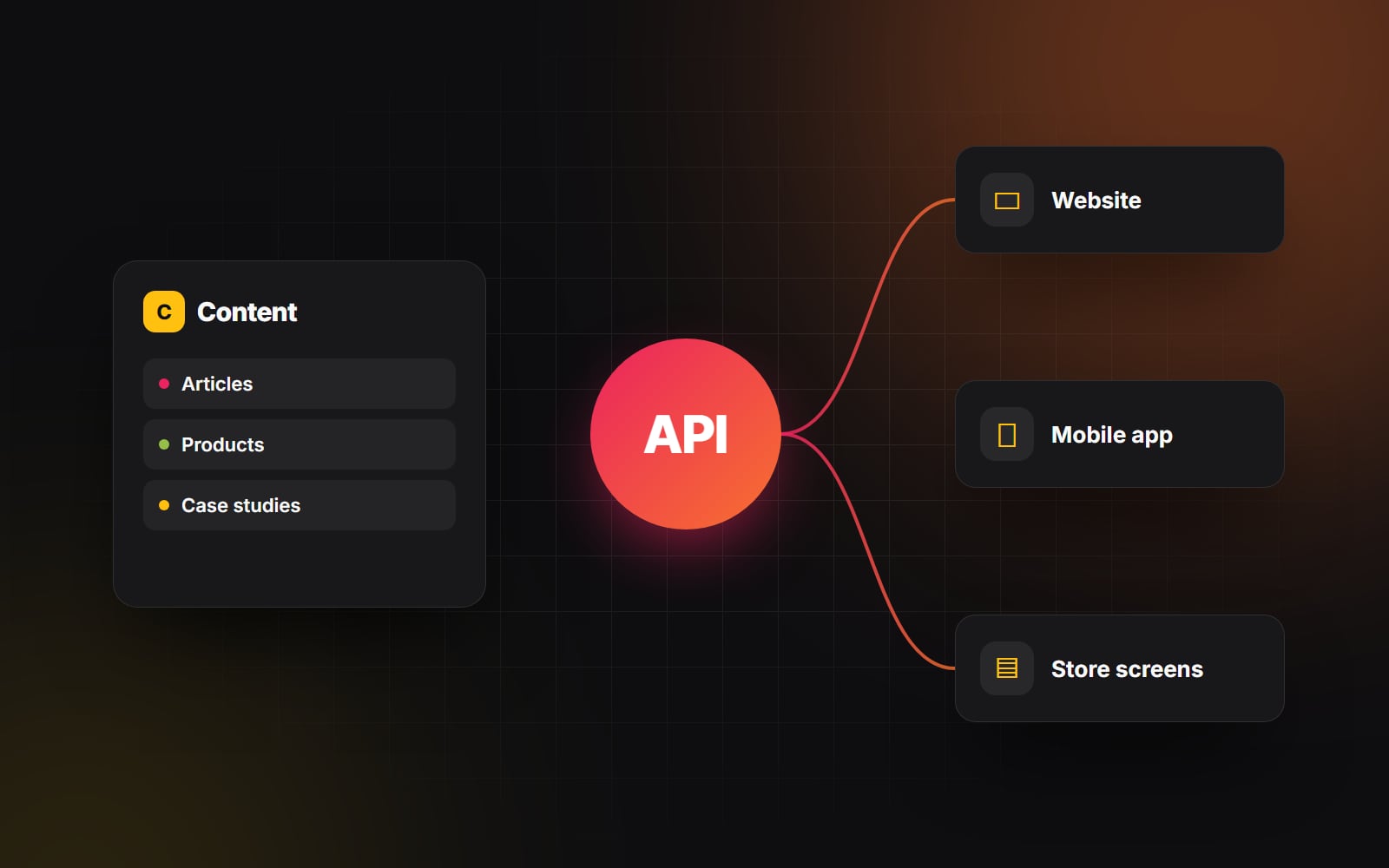
In a Headless CMS (such as Sanity, Strapi, Contentful, or Prismic), the "head" (the frontend website) is completely lopped off. The headless CMS is strictly a database with a polished editorial interface that serves your content as structured raw data via a REST or GraphQL API.
Your engineering team then builds a completely separate custom frontend application — typically using modern JavaScript frameworks like Next.js, Remix, Astro, or Nuxt — that fetches that raw data via API and renders lightning-fast pages globally.
The genuine advantages of going headless
When deployed for the right organizational requirements, a headless architecture delivers extraordinary benefits:
1. Uncompromised speed and edge performance
Traditional monolithic CMS setups must execute server queries and process PHP code every time a page is requested (unless heavy caching layers are configured). A decoupled Next.js or Astro frontend can statically pre-render every page at build time and distribute them across a global Edge CDN network (like Vercel or Cloudflare). Pages can be served almost instantly, and Core Web Vitals are much easier to keep green.
2. True omnichannel content distribution
If your organization only has one website, headless may not be necessary. But if your content needs to be published simultaneously across a web app, an iOS native app, an Android app, digital in-store signage, and a customer portal, headless is unmatched. Your content team writes a product description once in Sanity, and all five platforms update instantly via API.
3. Total frontend engineering freedom
Frontend developers are never constrained by the templating limitations, outdated JavaScript libraries, or plugin conflicts of a legacy CMS. They can build rich, interactive experiences using modern React component libraries, Tailwind CSS, bespoke WebGL, and custom state management.
4. Superior security posture
Because there is no direct database connection, PHP runtime, or vulnerable admin login URL exposed on the public frontend domain, common attack vectors (such as plugin vulnerabilities and brute-force login attempts) are greatly reduced.
The hidden costs and trade-offs of headless
Despite the architectural elegance of headless, some small and mid-sized businesses find the switch harder than expected. Here is why:
- Loss of native on-page visual editing: In platforms like Webflow or modern Shopify, marketers can click directly on a page, change text, swap images, and see the exact layout in real time. In a basic headless setup, marketers type into abstract form fields and must wait for preview builds to generate. Restoring real-time visual previews requires sophisticated custom engineering (such as Sanity Visual Editing or Contentful Live Preview).
- Higher development and maintenance costs: You are no longer managing one website; you are managing two distinct software applications: the headless CMS content schema and the standalone frontend web application. Every new feature, page template, or design tweak requires developer hours.
- Stack fragmentation: Forms, SEO metadata, sitemaps, site search and 301 redirects often don't work out of the box — your engineering team must build and maintain custom implementations for each of them.
A headless CMS is an enterprise engineering architecture, not a magic marketing upgrade. If your business doesn't have the developer resources to support it, it will slow you down.
The honest decision matrix: is headless right for you?
Choose a Headless Architecture if:
- 1 Your website is tightly coupled with a custom SaaS web application or native mobile app sharing the same content.
- 2 You have an in-house frontend engineering team proficient in Next.js/React that can actively maintain the repository.
- 3 You have complex internationalization requirements serving distinct localized content across dozens of regional storefronts.
- 4 Your website handles massive traffic spikes (millions of visitors) where traditional server infrastructure struggles to scale cost-effectively.
Stick with a Unified CMS (Webflow, Shopify, or WordPress) if:
- 1 Your website is primarily a marketing brochure, blog, or standard e-commerce storefront. (Choosing between them? Here's how.)
- 2 Your marketing team needs total autonomy to build, test, and publish landing pages weekly without waiting in a developer sprint queue.
- 3 You have a lean development budget and want to avoid ongoing retainer costs for basic content updates.
- 4 You want out-of-the-box SEO tools, form handlers, and analytics plugins that just work.
At Web Canvas, we don't believe in dogmatic tech choices. We build custom Next.js headless applications when scalability demands it, and clean Webflow or Shopify builds when marketing agility is paramount. If you're evaluating CMS options for your next project, let's talk through your team's workflow and pick the right architecture for your roadmap.
Planning something similar?
Tell us what you're building and we'll come back with ideas and next steps.