How to redesign your website without losing your Google rankings.
A relaunch is the riskiest moment for your search rankings. Here's the pre-launch and migration checklist we use to protect the organic traffic you've earned.
There are few agency horror stories worse than this: a company invests six months and tens of thousands of dollars into a sleek, modern website redesign. The new brand identity looks stunning, the executive team is thrilled, and the site launches to champagne toasts on a Friday afternoon.
Three weeks later, the panic sets in. Organic traffic drops by 45%. High-converting commercial search queries drop off page one of Google. Inbound demo requests dry up, and the marketing director is suddenly fighting for their job.
What went wrong? The new website was designed for visual aesthetics, but its historical search equity was neglected during migration. URL structures were altered without redirects, canonical tags were misconfigured, heading hierarchies were broken, and high-ranking legacy content was deleted because someone thought it looked "cluttered".
A website redesign does not have to sacrifice organic search traffic. When managed with technical discipline, a redesign should actually increase your organic visibility. Here is the exact pre-launch and post-launch migration checklist we follow at Web Canvas to protect and grow our clients' rankings.
Phase 1: Pre-launch audit and legacy URL inventory
The biggest mistake teams make is starting the redirect mapping two days before launch. SEO migration begins before the design team finishes wireframes.
1. Crawl and inventory every single existing URL
Run a comprehensive crawl of your live website using tools like Screaming Frog SEO Spider or Sitebulb. You need a complete master spreadsheet containing:
- Every indexable HTML page URL currently live on the domain.
- Current HTTP status codes (200, 301, 404).
- Existing title tags, meta descriptions, H1 headers, and canonical URLs.
- Internal link count pointing to each page.
2. Cross-reference with Google Search Console and GA4 data
Not all pages are created equal. Export the last 12 months of performance data from Google Search Console and Google Analytics. Identify your most valuable pages — the articles, product pages and service pages that drive most of your organic clicks and conversions. These URLs are your sacred assets; their content and search intent must be preserved with surgical precision.
Phase 2: URL mapping and 1:1 301 redirects
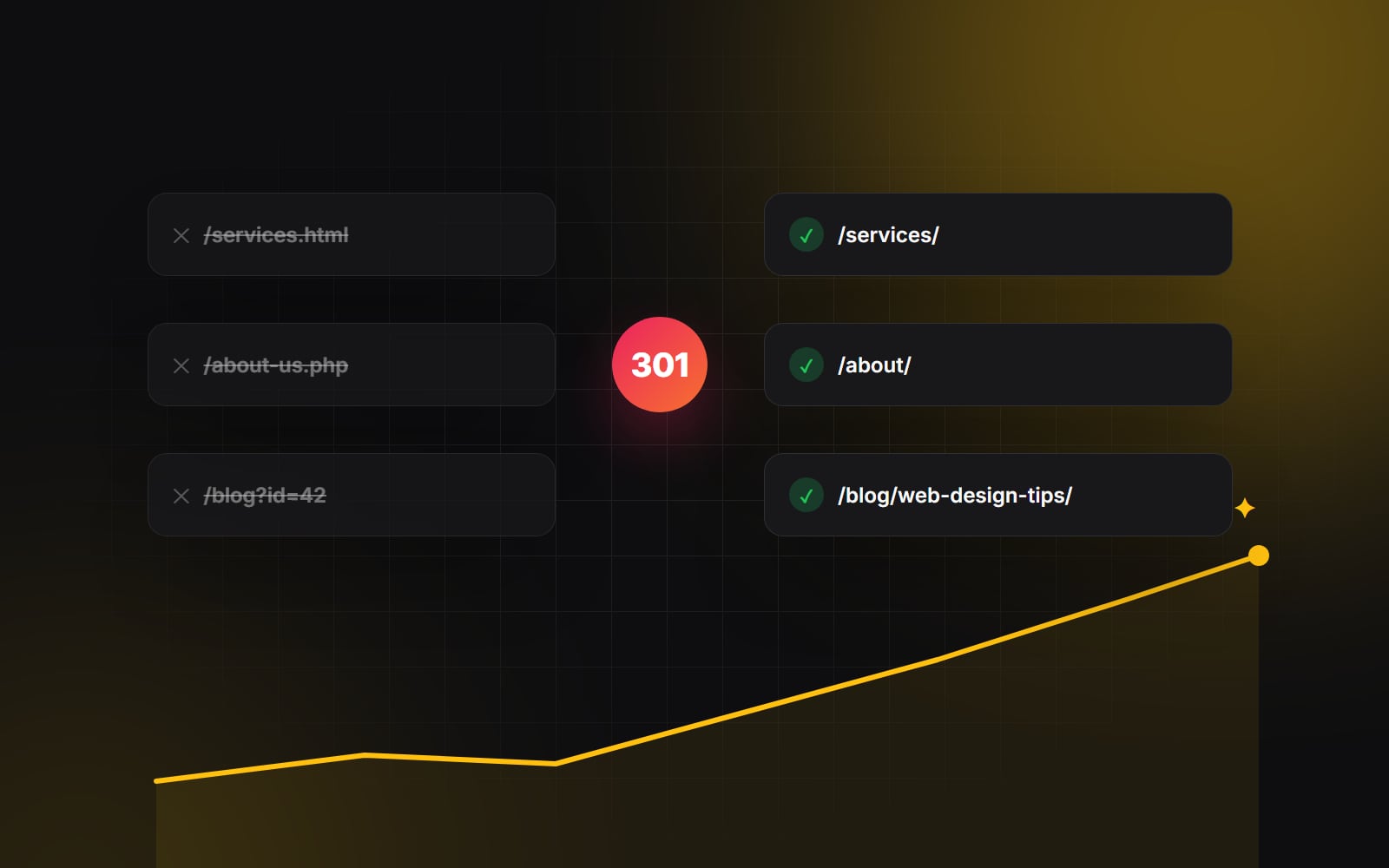
If you change your URL structure during a redesign — for example, migrating from /services/web-design/ to /service/web-design/, or shortening blog categories — Google treats the new URLs as brand new pages unless you explicitly inform the crawler via permanent 301 redirects. Changing platform too? Our Shopify migration checklist covers the store-specific steps.
The rules of redirect mapping
- 1:1 semantic mapping: Never redirect all old pages to the homepage. If a legacy blog post about "B2B Lead Generation Tips" is being retired, redirect it to your most closely related active article or service page. Google often treats mass redirects to the homepage as soft 404s, so the ranking signals those pages earned are lost.
- Eliminate redirect chains: Ensure legacy redirects point directly to the final destination URL. Avoid chaining redirects (e.g., URL A → URL B → URL C), which drains crawl budget and slows down page rendering for users.
-
Preserve internal trailing slash conventions: Keep your URL formats consistent. If your new platform uses trailing slashes (
/blog/), ensure your redirect rules and internal links don't bounce back and forth between non-slash and slash variations.
Phase 3: Content and on-page architectural parity
A common mistake during redesigns is over-editing copy. A copywriter decides to "freshen up" a page that has ranked #1 for five years by replacing 1,500 words of thorough, helpful content with three vague marketing taglines.
If a legacy page currently ranks well, Google rewarded it because it thoroughly answered user intent. If you replace that substantive content with minimalist fluff, your rankings will crater regardless of your 301 redirects.
Preserving on-page equity
- 1 Maintain core keyword topics and search intent: You can completely redesign the visual presentation, improve typography, and add dynamic components, but preserve the substantive answers, technical explanations, and semantic subtopics that earned the ranking.
-
2
Maintain clean heading structure: Ensure every page has exactly one clear
<h1>reflecting the primary topic, followed by logically nested<h2>and<h3>subheadings. Don't use heading tags purely for visual sizing — screen readers rely on them too (more in our accessibility basics). - 3 Replicate or improve meta titles and descriptions: Don't leave meta descriptions blank during staging. Carry over your proven, high-CTR meta titles or optimize them thoughtfully based on current Search Console data.
Phase 4: Launch day protocol (The first 48 hours)
Launch day should be a calm, methodical checklist execution — never a chaotic scramble. Here is our launch day sequence:
-
Remove the noindex meta tag: Staging sites should sit behind a password, or at least carry
<meta name="robots" content="noindex, nofollow">, to prevent duplicate content being indexed. The most embarrassing launch mistake in web development is forgetting to remove the noindex directive when flipping DNS to production. - Upload and verify XML Sitemaps: Generate clean XML sitemaps containing only 200-OK canonical URLs and submit them directly inside Google Search Console.
-
Verify canonical tags and robots.txt: Check that your
robots.txtfile isn't accidentally blocking Googlebot from crawling essential CSS, JavaScript, or media directories. - Run an automated broken link crawl: Immediately crawl the live domain with Screaming Frog to catch any internal 404 errors, broken image links, or missing redirect rules.
A successful website redesign shouldn't just defend your past traffic — it should build a technical launchpad that accelerates your next two years of organic growth.
Phase 5: Post-launch monitoring and Search Console triage
Even with flawless preparation, Google can take several weeks to fully recrawl a redesigned site, process redirect graphs, and re-evaluate page quality. During this window, active monitoring is mandatory:
- 1 Monitor the GSC "Page Indexing" report daily: Watch for unexpected 404 spikes, redirect errors, or "Crawled - currently not indexed" flags.
- 2 Audit top-tier ranking keywords: Track your critical revenue-generating keywords in a rank tracker (such as Ahrefs or Semrush). Minor fluctuations are normal during re-crawling; sustained drops of 10+ positions indicate a content intent mismatch or broken redirect that requires immediate remediation.
- 3 Verify analytics and goal tracking: Ensure GA4 conversion events, Google Ads conversion tags, and HubSpot tracking codes are recording form submissions and transactions accurately.
Planning an upcoming website redesign and nervous about protecting your hard-earned SEO authority? At Web Canvas, technical SEO migration is integrated into every phase of our redesign process. Get in touch with our team, and let's safeguard your search traffic from day one.
Planning something similar?
Tell us what you're building and we'll come back with ideas and next steps.