API-first architecture: modern frontends on legacy backends.
How to put an API layer between old business systems and a new website, then move one part of the site at a time.
Many established businesses run their core operations on systems that are old but dependable: an ERP, an older e-commerce platform, an accounting package or a custom database built years ago. These systems hold the stock levels, prices, customer accounts and orders. They work, the team knows them, and replacing them would be expensive and disruptive.
The problem is usually the customer-facing side. The website or portal built on top of these systems can be slow, hard to change and awkward on a phone. Replacing everything at once is risky. An API-first approach lets you modernise what customers see while the systems behind it keep running.
What "API-first" means here
An API (application programming interface) is a defined way for one system to ask another for data or to make a change. In an API-first setup, the website does not reach into the ERP's database or call its quirky old endpoints directly. Instead, you design a clean set of endpoints (REST or GraphQL) that describe what the website needs: "list products in this category", "get this customer's orders", "create a quote request". A middle layer turns those requests into whatever the legacy system understands.
The new frontend can then be built in whatever suits the job, such as Next.js or a headless CMS for marketing content, without being tied to the old system's limits.
The strangler fig pattern: replace gradually
Martin Fowler named this approach after the strangler fig, a plant that grows around a host tree until it can stand on its own. You build the new system around the old one and move traffic across piece by piece, instead of switching everything on one date.
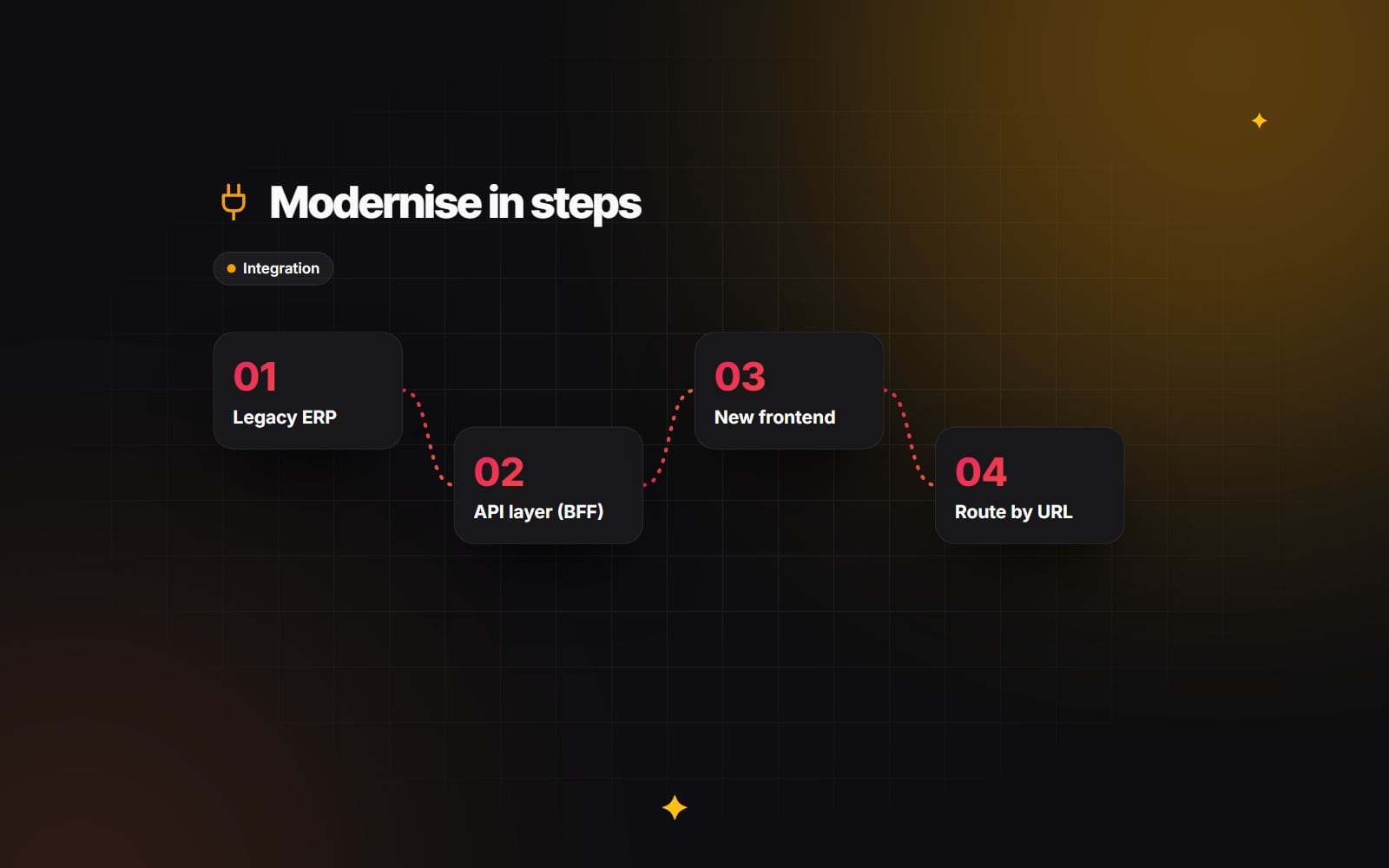
- 1 Choose the first area to move. Pick something visible to customers and relatively self-contained, such as the product catalogue or the marketing pages, rather than order fulfilment.
- 2 Define the API endpoints that area needs, based on what the pages actually display.
- 3 Build the middle layer that serves those endpoints using data from the legacy system.
- 4 Build the new frontend for that area against the new endpoints.
- 5 Route only those URLs to the new frontend, using your CDN or reverse proxy, while every other URL continues to go to the old site.
- 6 Watch errors and performance, fix what you find, then pick the next area.
Because each step is small, a problem affects one part of the site and can be rolled back by changing a routing rule.
The middle layer (backend-for-frontend)
The layer between the frontend and the legacy systems is often called a backend-for-frontend (BFF), because it is shaped around what the frontend needs. It can be written in Node.js, PHP (for example Laravel), Go or whatever your team supports well. Connecting a modern frontend directly to legacy endpoints tends to cause trouble: old systems often return large or awkward responses, use session handling that does not suit a modern site, and respond slowly. The BFF handles that.
What the BFF does
- Shapes the data. It converts legacy formats (XML, oddly named fields, internal flags) into clean responses that contain only what the page uses.
- Caches slow reads. Product details and price lists that change a few times a day can be cached, so a busy period on the website does not translate into heavy load on the ERP.
- Handles slow writes asynchronously. For actions that take the old system a while, the BFF can accept the request, confirm receipt to the visitor and put the work on a queue (for example Redis-backed queues, RabbitMQ or Amazon SQS) for a worker to process.
- Centralises authentication. The BFF deals with the legacy system's login method so the frontend uses one modern approach.
- Fails gracefully. If the legacy system is unavailable, the BFF can return cached data or a clear message instead of an error page.
REST or GraphQL?
| Consideration | REST | GraphQL |
|---|---|---|
| How data is requested | Fixed endpoints, one per resource or action | A single endpoint; the client asks for the fields it wants |
| Caching | Straightforward with standard HTTP caching | Usually needs caching inside the server or client |
| Good for | Simple, stable needs; teams new to APIs | Several frontends needing different views of the same data |
| Watch out for | Endpoints multiplying over time | Expensive queries reaching slow legacy systems |
Either works. What matters more is that the endpoints are documented, versioned and designed around the frontend's needs rather than the legacy database tables.
What you gain
- Faster frontend changes. Marketing pages and content can be updated without touching the ERP or waiting for backend work.
- One API, several channels. The same endpoints can serve the website, a mobile app, a sales team's tablet app or partner feeds.
- An easier future migration. When the legacy system is finally replaced, you rewrite the connectors in the middle layer. The frontend keeps calling the same endpoints.
- Less risk. Each step is small and reversible, and the old system keeps doing the work it is good at in the meantime.
Common mistakes
- 1 Exposing raw legacy data. Passing database rows straight through the API leaks internal fields and sends far more data than the page needs. Shape responses in the BFF.
- 2 Making visitors wait on slow writes. If the old system takes a long time to save an order or enquiry, do not keep the browser waiting. Queue the work and confirm receipt.
- 3 No plan for outages. Legacy systems have maintenance windows. Decide in advance what the site shows when the backend is unavailable, and use timeouts and a circuit breaker (stop calling a failing service for a short period) so one slow system does not take the whole site down.
- 4 Mixing authentication methods in the browser. Handle the translation between legacy sessions and modern tokens on the server, in one place.
- 5 No automated tests on the contract. Small changes to an endpoint can quietly break checkout or enquiry forms. Add automated tests that check key journeys and the shape of API responses before each release.
Also make sure the data behind both systems is protected. Our guide to backups that actually restore applies to the middle layer's configuration and any data it stores, not just the website.
Where to start
- 1 List the customer-facing journeys that cause the most complaints or internal effort.
- 2 Map which legacy system holds the data for each one, and how it can be accessed (existing API, export, database read).
- 3 Pick one journey and define the handful of endpoints it needs.
- 4 Build and launch that journey behind a routing rule, with monitoring in place.
- 5 Review what you learnt before choosing the next one.
If you are weighing up a rebuild on top of existing business systems, our web development and integrations pages describe how we approach this work. You are welcome to get in touch with a short outline of your current systems and what you would like to change first.
Planning something similar?
Tell us what you're building and we'll come back with ideas and next steps.